
spine-sdl 运行时文档
Licensing
将官方的Spine Runtime整合到你的应用程序前请务必先阅读 Spine 运行时许可证.
开始使用
spine-sdl 是一个基于 C 和 C++ 的运行时, 用于通过 SDL 加载、操作和渲染 Spine skeleton.
spine-sdl 需要 SDL 2.0.18+ 版本, 并支持除双色着色(tint)外的全部 Spine 功能.
安装
spine-sdl 运行时以 C 和 C++ API 的形式提供. 两种 API 都基于 spine-c 和 spine-cpp 运行时. 请注意, spine-c 依赖于 spine-cpp, 因此无论你选择使用哪种 API, 两者都是必需的.
使用 CMake 集成(推荐)
将 spine-sdl 集成到你的项目中最简单的方法是通过 CMake FetchContent:
project(MySpineProject)
include(FetchContent)
FetchContent_Declare(
spine-sdl
GIT_REPOSITORY https://github.com/esotericsoftware/spine-runtimes.git
GIT_TAG 4.3
SOURCE_SUBDIR spine-sdl
)
FetchContent_MakeAvailable(spine-sdl)
# Create your executable
add_executable(MyApp main.cpp)
# For C API
target_link_libraries(MyApp spine-sdl-c)
# For C++ API
target_link_libraries(MyApp spine-sdl-cpp)
这将自动获取并构建 spine-sdl 及其所有依赖项(spine-c、spine-cpp 和 SDL).
手动集成
如果你更喜欢手动集成:
- 使用 git 下载 Spine Runtimes 源码(
git clone https://github.com/esotericsoftware/spine-runtimes)或下载为 zip 文件. - 将所需的源文件添加到你的项目中:
- 对于 C API: 添加
spine-cpp/src、spine-c/src和spine-sdl/src/spine-sdl-c.c中的源文件 - 对于 C++ API: 添加
spine-cpp/src、spine-c/src和spine-sdl/src/spine-sdl-cpp.cpp中的源文件
- 对于 C API: 添加
- 添加包含目录:
spine-cpp/include、spine-c/include和spine-sdl/src - 链接到 SDL2
在你的 C 或 C++ 代码中, 包含以下任一头文件以访问 spine-sdl API:
#include <spine-sdl-c.h>
// C++ API
#include <spine-sdl-cpp.h>
注意: spine-sdl 需要自 SDL 2.0.18 起可用的
SDL_RenderGeometryAPI. 早期版本的 SDL 与 spine-sdl 不兼容.
示例
spine-sdl 示例可在 Windows、Linux 和 Mac OS X 上运行. 对于基于 spine-c 的示例, 请参见 example/main.c;对于 spine-cpp 示例, 请参见 example/main.cpp.
Windows
- 安装 Visual Studio Community. 确保安装 C++ 和 CMake 支持.
- 使用 git 下载 Spine Runtimes 存储库(
git clone https://github.com/esotericsoftware/spine-runtimes)或下载为 zip 文件. - 打开 Visual Studio Community, 然后通过 Visual Studio Community 启动器中的 打开本地文件夹 按钮打开
spine-sdl/文件夹. - 等待 CMake 完成, 然后选择
spine-sdl-c-example.exe或spine-sdl-cpp-example.exe作为启动项目并开始调试.
Linux
-
安装依赖项:
bashsudo apt-get install cmake ninja-build # Ubuntu/Debian
# 或适用于你的发行版的等效命令 -
克隆存储库:
git clone https://github.com/esotericsoftware/spine-runtimes -
构建并运行:
bashcd spine-runtimes/spine-sdl
./build.sh
./build/debug/spine-sdl-c-example # Run C example
./build/debug/spine-sdl-cpp-example # Run C++ example
macOS
-
安装 Xcode
-
安装 Homebrew
-
安装依赖项:
bashbrew install cmake ninja -
克隆存储库:
git clone https://github.com/esotericsoftware/spine-runtimes -
构建并运行:
bashcd spine-runtimes/spine-sdl
./build.sh
./build/debug/spine-sdl-c-example # Run C example
./build/debug/spine-sdl-cpp-example # Run C++ example
使用 spine-sdl
spine-sdl 运行时支持使用 SDL 播放和操作 Spine 创建的动画. spine-sdl 运行时提供 C 和 C++ 两种实现, 分别基于通用的 spine-c 和 spine-cpp 运行时. 它基于 SDL API 添加了加载和渲染实现.
请参阅 Spine 运行时指南 以获取 Spine 运行时架构的详细概述, 以及 spine-c 和 spine-cpp 文档以了解用于播放和操作 Spine 动画的核心 API 信息.
为SDL导出资产
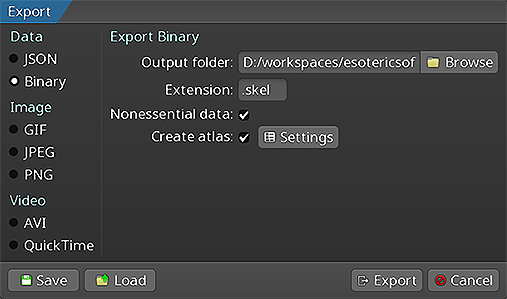 请按照 Spine 用户指南中的说明操作:
导出skeleton数据和skeleton texture atlas将生成以下文件:
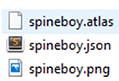
skeleton-name.json或skeleton-name.skel, 包含skeleton和动画数据.skeleton-name.atlas, 包含texture atlas的信息.- 一个或多个
.png文件, 每个文件代表texture atlas中的一页, 包含skeletons使用的打包图片.
注意: spine-sdl 运行时不支持双色着色.
加载 Spine skeletons
spine-sdl 运行时使用 SDL_Renderer API 来显示skeleton. 在从导出的文件加载skeletons之前, 必须先创建一个 SDL_Renderer:
使用 C API 加载
使用 spine-c API 加载需要texture加载回调和手动文件读取:
static SDL_Renderer *g_renderer;
// Texture loading callbacks
void *load_texture_callback(const char *path) {
extern void *load_texture(const char *path, SDL_Renderer *renderer);
return load_texture(path, g_renderer);
}
void unload_texture_callback(void *texture) {
SDL_DestroyTexture((SDL_Texture*)texture);
}
// Set the global renderer
g_renderer = renderer;
// Read atlas file into memory
int atlas_length;
char *atlas_data = read_file("data/spineboy-pma.atlas", &atlas_length);
// Load atlas with callbacks
spine_atlas_result atlas_result = spine_atlas_load_callback(
atlas_data, "data/", load_texture_callback, unload_texture_callback);
spine_atlas atlas = spine_atlas_result_get_atlas(atlas_result);
// Read skeleton file into memory
int skeleton_length;
char *skeleton_data = read_file("data/spineboy-pro.json", &skeleton_length);
// Load skeleton data
spine_skeleton_data_result skeleton_result = spine_skeleton_data_load_json(
atlas, skeleton_data, "data/");
spine_skeleton_data skeleton_data_handle = spine_skeleton_data_result_get_data(skeleton_result);
// Free file data
free(atlas_data);
free(skeleton_data);
使用 C++ API 加载
对于 C++ API, 需要一个 SDLTextureLoader:
spine::SDLTextureLoader textureLoader(renderer);
spine::Atlas atlas("data/spineboy-pma.atlas", &textureLoader);
spine::SkeletonJson json(atlas);
spine::SkeletonData *skeletonData = json.readSkeletonDataFile("data/spineboy-pro.json");
加载的skeleton数据和atlas可以且应该在skeletons实例之间共享, 以减少内存消耗并启用共享相同atlas数据的skeleton的批量渲染.
渲染skeleton
spine-sdl 提供了直接与skeleton和skeleton可绘制对象一起工作的简单渲染函数.
C API
spine_skeleton_drawable drawable = spine_skeleton_drawable_create(skeleton_data_handle);
spine_skeleton skeleton = spine_skeleton_drawable_get_skeleton(drawable);
spine_animation_state animation_state = spine_skeleton_drawable_get_animation_state(drawable);
// Setup skeleton
spine_skeleton_set_position(skeleton, 400, 500);
spine_skeleton_set_scale(skeleton, 0.5f, 0.5f);
spine_skeleton_setup_pose(skeleton);
// Setup animation
spine_animation_state_set_animation_1(animation_state, 0, "portal", false);
spine_animation_state_add_animation_1(animation_state, 0, "run", true, 0);
// Update and render (in your main loop)
spine_skeleton_drawable_update(drawable, deltaTime);
spine_sdl_draw(drawable, renderer, true); // true for premultiplied alpha
// Or draw skeleton directly without drawable
spine_sdl_draw_skeleton(skeleton, renderer, true);
// Cleanup
spine_skeleton_drawable_dispose(drawable);
spine_skeleton_data_dispose(skeleton_data_handle);
spine_atlas_dispose(atlas);
spine_skeleton_data_result_dispose(skeleton_result);
spine_atlas_result_dispose(atlas_result);
C++ API
spine::Skeleton skeleton(*skeletonData);
spine::AnimationStateData animationStateData(*skeletonData);
spine::AnimationState animationState(animationStateData);
// Setup skeleton
skeleton.setPosition(400, 500);
skeleton.setupPose();
// Setup animation
animationState.setAnimation(0, "portal", false);
animationState.addAnimation(0, "run", true, 0);
// Update and render (in your main loop)
animationState.update(deltaTime);
animationState.apply(skeleton);
skeleton.update(deltaTime);
skeleton.updateWorldTransform(spine::Physics_Update);
// Draw using the simple SDL_draw function
spine::SDL_draw(skeleton, renderer, true); // true for premultiplied alpha
// Cleanup
delete skeletonData;
delete &atlas;
请参阅 spine-c 和 spine-cpp 文档以获取有关操作skeleton和动画状态的 API 的更多信息.
清理
当你不再需要skeleton和atlas数据时, 释放它们的内存:
C API
spine_skeleton_drawable_dispose(drawable);
spine_skeleton_data_dispose(skeleton_data_handle);
spine_atlas_dispose(atlas);
spine_skeleton_data_result_dispose(skeleton_result);
spine_atlas_result_dispose(atlas_result);
// Free manually allocated file data
free(atlas_data);
free(skeleton_data);
C++ API
delete skeletonData;
delete &atlas; // If allocated with new
注意: 释放skeleton数据和atlas实例将通过texture加载器自动处置任何关联的 SDL texture.