
spine-glfw 运行时文档
Licensing
将官方的Spine Runtime整合到你的应用程序中前请阅读 Spine 运行时许可.
开始使用
spine-glfw 是一个基于 C 和 C++ 的运行时, 使用 GLFW 和 OpenGL 来加载、操作和渲染 Spine skeleton动画.
spine-glfw 要求 GLFW 3.0+ 及 OpenGL 3.3+, 并完整支持全部 Spine 功能.
安装
spine-glfw 运行时同时提供 C 和 C++ 两种 API 接口, 二者均基于 spine-c 和 spine-cpp 运行时实现. 请注意, spine-c 依赖于 spine-cpp, 因此无论你使用哪种 API, 两者均需同时集成.
使用CMake集成(推荐)
将 spine-glfw 集成到项目中最简便的方式是使用 CMake 的 FetchContent:
project(MySpineProject)
include(FetchContent)
FetchContent_Declare(
spine-glfw
GIT_REPOSITORY https://github.com/esotericsoftware/spine-runtimes.git
GIT_TAG 4.3
SOURCE_SUBDIR spine-glfw
)
FetchContent_MakeAvailable(spine-glfw)
# Create your executable
add_executable(MyApp main.cpp)
# Link against spine-glfw (includes spine-cpp, spine-c, GLFW, and glbinding)
target_link_libraries(MyApp spine-glfw)
该配置将自动拉取并构建 spine-glfw 及其全部依赖项(spine-c、spine-cpp、GLFW 和 glbinding).
手动集成
如需手动集成, 需要执行以下步骤:
- 使用 git 下载 Spine 运行时源码(
git clone https://github.com/esotericsoftware/spine-runtimes), 或下载 ZIP 压缩包. - 将所需源文件添加至项目:
- 添加
spine-cpp/src、spine-c/src和spine-glfw/src/spine-glfw.cpp中的源代码.
- 添加
- 添加包含(include)目录:
spine-cpp/include、spine-c/include和spine-glfw/src. - 链接 GLFW、OpenGL 和 glbinding 库
在 C++ 代码中, 还需要包含以下头文件才能访问 spine-glfw API:
请注意: spine-glfw 依赖于 OpenGL 3.3 Core Profile或更高版本. 运行时使用了现代 OpenGL 特性, 包括顶点数组对象(VAO)、顶点缓冲对象(VBO)和 GLSL 着色器.
示例
spine-glfw 示例可在 Windows、Linux 和 macOS 上运行. 基于 spine-cpp 的示例请见 example/main.cpp, 基于 spine-c 的示例请见 example/main-c.cpp.
Windows
- 安装 Visual Studio Community, 同时记得安装 C++ 和 CMake 支持.
- 使用 git 下载 Spine 运行时代码库(
git clone https://github.com/esotericsoftware/spine-runtimes), 或下载 ZIP 文件. - 启动 Visual Studio Community, 点击启动器中的 “打开本地文件夹” 按钮来打开
spine-glfw/目录. - 等待 CMake 配置完成, 然后将
spine-glfw-example.exe或spine-glfw-example-c.exe设置为启动项目, 并启动调试.
Linux
-
安装依赖项:
bashsudo apt-get install cmake ninja-build libgl1-mesa-dev libx11-dev libxrandr-dev libxinerama-dev libxcursor-dev libxi-dev # Ubuntu/Debian
# or equivalent for your distribution -
克隆代码库:
git clone https://github.com/esotericsoftware/spine-runtimes -
构建并运行:
bashcd spine-runtimes/spine-glfw
./build.sh
./build/debug/spine-glfw-example-c # Run C example
./build/debug/spine-glfw-example # Run C++ example
macOS
-
安装 Xcode
-
安装 Homebrew
-
安装依赖项:
bashbrew install cmake ninja -
克隆代码库:
git clone https://github.com/esotericsoftware/spine-runtimes -
构建并运行:
bashcd spine-runtimes/spine-glfw
./build.sh
./build/debug/spine-glfw-example-c # Run C example
./build/debug/spine-glfw-example # Run C++ example
使用spine-glfw
spine-glfw 运行时基于 GLFW 和 OpenGL, 可以播放和操作由 Spine 创建的动画. 该运行时提供 C 和 C++ 两种实现, 均基于通用的 spine-c 和 spine-cpp 运行时, 并新增了基于 OpenGL API 的加载与渲染功能.
有关 Spine 运行时架构的详细说明, 请参阅 Spine 运行时指南;有关使用 C/C++ 操作 Spine 动画的核心 API, 请参阅 spine-c 和 spine-cpp 文档.
为GLFW导出资产
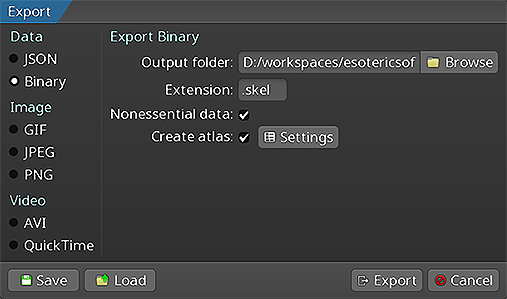 请遵循 Spine 用户指南中的说明完成以下操作:
导出skeleton数据和texture atlas将生成以下文件:
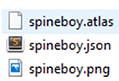
skeleton-name.spine-json或skeleton-name.skel, 包含了skeleton和动画数据.skeleton-name.atlas, 包含了texture atlas相关的信息.- 一张或多张
.png图像文件, 每个文件代表了texture atlas中的一页, 而texture atlas包含了skeleton所需的全部图片.
加载Spine skeletons
spine-glfw 运行时使用 OpenGL 渲染skeletons. 在运行时中加载skeletons导出文件前, 必须先创建 GLFW 窗口和 OpenGL 上下文:
if (!glfwInit()) {
// Handle error
return -1;
}
// Set OpenGL version to 3.3 Core Profile
glfwWindowHint(GLFW_CONTEXT_VERSION_MAJOR, 3);
glfwWindowHint(GLFW_CONTEXT_VERSION_MINOR, 3);
glfwWindowHint(GLFW_OPENGL_PROFILE, GLFW_OPENGL_CORE_PROFILE);
// Create window
GLFWwindow* window = glfwCreateWindow(800, 600, "Spine GLFW", NULL, NULL);
glfwMakeContextCurrent(window);
// Initialize OpenGL function loading (e.g., with glbinding)
glbinding::initialize(glfwGetProcAddress);
使用C API加载
C API 需要实现texture加载回调函数并执行手动文件读取:
void *load_texture(const char *path) {
return (void *)(uintptr_t)texture_load(path);
}
void unload_texture(void *texture) {
texture_dispose((texture_t)(uintptr_t)texture);
}
// Read atlas file into memory
int atlas_length = 0;
uint8_t *atlas_bytes = read_file("data/spineboy-pma.atlas", &atlas_length);
// Load atlas with callbacks
spine_atlas_result atlas_result = spine_atlas_load_callback(
(const char*)atlas_bytes, "data/", load_texture, unload_texture);
spine_atlas atlas = spine_atlas_result_get_atlas(atlas_result);
// Read skeleton file into memory
int skeleton_length = 0;
uint8_t *skeleton_bytes = read_file("data/spineboy-pro.skel", &skeleton_length);
// Load skeleton data
spine_skeleton_data_result skeleton_result = spine_skeleton_data_load_binary(
atlas, skeleton_bytes, skeleton_length, "data/");
spine_skeleton_data skeleton_data = spine_skeleton_data_result_get_data(skeleton_result);
// Free file data
free(atlas_bytes);
free(skeleton_bytes);
使用C++ API加载
C++ API 则需要实现一个 GlTextureLoader 实例:
spine::GlTextureLoader textureLoader;
spine::Atlas *atlas = new spine::Atlas("data/spineboy-pma.atlas", &textureLoader);
// Load skeleton data from binary
spine::SkeletonBinary binary(*atlas);
spine::SkeletonData *skeletonData = binary.readSkeletonDataFile("data/spineboy-pro.skel");
// Or load from JSON
spine::SkeletonJson json(*atlas);
spine::SkeletonData *skeletonData = json.readSkeletonDataFile("data/spineboy-pro.json");
加载的skeleton数据和atals可跨多skeleton实例共享, 以减少内存占用, 同时支持对使用相同atlas数据的skeleton进行合批渲染.
渲染器
spine-glfw 在 spine-c 和 spine-cpp 基础上新增的核心功能是渲染系统. 该系统负责管理 OpenGL 渲染管线, 包括着色器、网格和texture.
renderer_t *renderer = renderer_create();
renderer_set_viewport_size(renderer, windowWidth, windowHeight);
渲染器将自动创建并管理专为 Spine Skelton 渲染优化的 OpenGL 着色器.
渲染 Skeletons
spine-glfw 提供直接用于skeleton与skeleton drawables(可绘制对象)的渲染函数.
C API
spine_skeleton_drawable drawable = spine_skeleton_drawable_create(skeleton_data);
spine_skeleton skeleton = spine_skeleton_drawable_get_skeleton(drawable);
spine_animation_state animation_state = spine_skeleton_drawable_get_animation_state(drawable);
// Setup skeleton
spine_skeleton_set_position(skeleton, 400, 500);
spine_skeleton_set_scale(skeleton, 0.3f, 0.3f);
spine_skeleton_setup_pose(skeleton);
// Setup animation
spine_animation_state_set_animation_1(animation_state, 0, "portal", false);
spine_animation_state_add_animation_1(animation_state, 0, "run", true, 0);
// Update and render (in your main loop)
spine_skeleton_drawable_update(drawable, deltaTime);
renderer_draw_c(renderer, skeleton, true); // true for premultiplied alpha
// Cleanup
spine_skeleton_drawable_dispose(drawable);
spine_skeleton_data_dispose(skeleton_data);
spine_atlas_dispose(atlas);
spine_skeleton_data_result_dispose(skeleton_result);
spine_atlas_result_dispose(atlas_result);
C++ API
spine::Bone::setYDown(true);
// Create skeleton and animation state
spine::Skeleton skeleton(*skeletonData);
spine::AnimationStateData animationStateData(*skeletonData);
spine::AnimationState animationState(animationStateData);
// Setup skeleton
skeleton.setPosition(400, 500);
skeleton.setScaleX(0.5f);
skeleton.setScaleY(0.5f);
skeleton.setupPose();
// Setup animation
animationStateData.setDefaultMix(0.2f);
animationState.setAnimation(0, "portal", false);
animationState.addAnimation(0, "run", true, 0);
// Update and render (in your main loop)
animationState.update(deltaTime);
animationState.apply(skeleton);
skeleton.update(deltaTime);
skeleton.updateWorldTransform(spine::Physics_Update);
// Clear screen
gl::glClear(gl::GL_COLOR_BUFFER_BIT);
// Render skeleton
renderer_draw(renderer, &skeleton, true); // true for premultiplied alpha
// Cleanup
delete skeletonData;
delete atlas;
有关操作skeletons与动画状态的 API 详情, 请参阅 spine-c 和 spine-cpp 文档.
清理资产
当不再需要skeleton与atlas数据时, 应释放其占用的内存:
C API
renderer_dispose(renderer);
spine_skeleton_drawable_dispose(drawable);
spine_skeleton_data_dispose(skeleton_data);
spine_atlas_dispose(atlas);
spine_skeleton_data_result_dispose(skeleton_result);
spine_atlas_result_dispose(atlas_result);
// Free manually allocated file data
free(atlas_bytes);
free(skeleton_bytes);
// Cleanup GLFW
glfwTerminate();
C++ API
renderer_dispose(renderer);
delete skeletonData;
delete atlas;
// Cleanup GLFW
glfwTerminate();
请注意:销毁skeleton数据和atlas实例时, 将通过texture加载器自动销毁关联的 OpenGL 纹理. 使用 spine-c 时, 则必须手动销毁用
malloc()或read_file()分配的文件数据内存.