# spine-cpp 运行时文档
> **Licensing**
>
> 将官方的Spine运行时整合到你的应用程序之前, 请仔细阅读 [Spine运行时许可页面](/spine-runtimes-license).
!!
# 开始使用
spine-cpp 是一个通用的 C++ 运行时, 可将 Spine 动画集成到游戏引擎和使用 C++ 接口的框架中.
spine-cpp 提供了如下功能:
* 加载并操作 [Spine skeletons](/spine-loading-skeleton-data) 和 [texture atlases](/spine-texture-packer)
* 应用并mix [动画](/spine-applying-animations)
* 管理并应用skeleton的 [皮肤](/spine-runtime-skins)
* 根据当前的 [skeleton pose, 槽位&附件状态](/spine-runtime-skeletons) 处理和计算渲染和物理引擎所需的数据.
Spine-cpp 运行时是一个通用、独立于引擎的运行时, 用户只需通过 TextureLoader 实现加载你所需 texture, 并将渲染指令传入引擎的渲染系统即可.
spine-cpp 运行时遵循 C++11 标准, 与使用纯 C 的 [spine-c](/spine-c) 公开了完全相同的API.
其他的官方Spine运行时是基于spine-cpp编写的, 因此亦可作为引擎集成的示例以供研究:
* [spine-ios](/git/spine-runtimes/tree/spine-ios) - iOS 集成
* [spine-flutter](/git/spine-runtimes/tree/spine-flutter) - Flutter 集成
* [spine-sdl](/git/spine-runtimes/tree/spine-sdl) - SDL 集成
* [spine-glfw](/git/spine-runtimes/tree/spine-glfw) - GLFW 集成
* [spine-ue](/git/spine-runtimes/tree/spine-ue) - 虚幻引擎集成
* [spine-godot](/git/spine-runtimes/tree/spine-godot) - Godot 集成
> **注意:** 本指南已假定你了解基本的[运行时架构](/spine-runtime-architecture)和Spine术语. 也请查阅[API 参考文档](/spine-api-reference)以探索运行时的更多高级功能.
# 集成spine-cpp到项目中
## CMake集成 (推荐方式)
将 spine-cpp 集成到你的项目中最简单的方法是通过 CMake FetchContent:
```cmake
include(FetchContent)
FetchContent_Declare(
spine-cpp
GIT_REPOSITORY https://github.com/esotericsoftware/spine-runtimes.git
GIT_TAG 4.3
SOURCE_SUBDIR spine-cpp
)
FetchContent_MakeAvailable(spine-cpp)
# Link against spine-cpp
target_link_libraries(your_target spine-cpp)
```
这会自动获取并构建 spine-cpp 及其依赖.
最后在代码中引入 spine-cpp 头文件即可:
```cpp
#include
using namespace spine;
```
## 手动集成
如果需要手工集成:
1. 使用 git (`git clone https://github.com/esotericsoftware/spine-runtimes`) 或者 zip 压缩包获取 Spine Runtimes 源码
2. 将以下源文件加入项目:
* `spine-cpp/src` 目录下的源文件
3. 将以下目录引入项目: `spine-cpp/include`
最后在代码中引入 spine-cpp 头文件即可:
```cpp
#include
using namespace spine;
```
# 导出适用spine-cpp的Spine资产
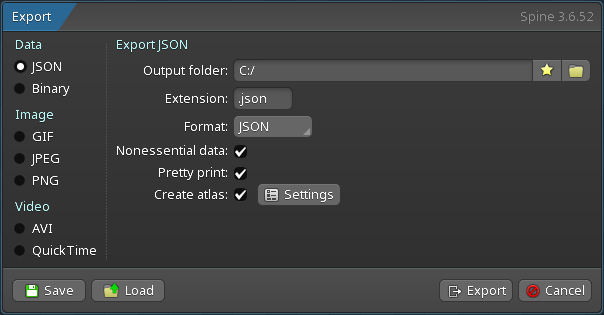
请按照Spine用户指南中的操作步骤, 了解如何:
1. 将[skeleton & 动画数据](/spine-export)导出为JSON或二进制格式
2. [导出包含skeleton图像的texture atlases](/spine-texture-packer)
导出的skeleton数据和texture atlas将产生以下文件:
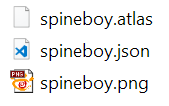
1. `skeleton-name.json` 或 `skeleton-name.skel` 文件, 包含了skeleton和动画数据.
2. `skeleton-name.atlas`, 包含了texture atlas的相关信息.
3. 一张或多张 `.png` 文件, 每一个文件表示texture atlas中的一页, 每个页则指打包成页的skeleton所引用的图像.
> **注意:** 可以将多个 skeleton 的图像打包成一个 texture atlas. 请见 [texture 打包指南](/spine-texture-packer).
# 加载Spine资产
spine-cpp提供了加载 texture atlases, Spine skeleton 数据(骨骼、槽位、附件、皮肤、动画)和通过[动画状态数据](/spine-applying-animations#混合时间)定义动画间 mix 时间的 API. 这三种类型的数据, 也被称为 setup pose 数据, 通常加载一次后就能被每个游戏对象(game object)共享. 共享机制是通过赋予每个游戏对象其不同的 Skelton 和[动画状态](/spine-applying-animations#AnimationState-API)来实现的, 亦称其为实例数据.
> **注意:** 关于全局加载架构的更详细描述, 请参考更通用的 [Spine 运行时文档](/spine-loading-skeleton-data).
## 加载texture atlases
Texture atlas数据以自有的 [atlas 格式](/spine-atlas-format)存储, 它描述了 atlas 页中各图像的位置. Atlas 页本身则以普通的 `.png` 文件的形式存在 atlas 文件旁边.
spine-cpp 使用 `TextureLoader` 接口来加载 textures. 你得在你的引擎中自行实现该接口:
### 实现你的TextureLoader
```cpp
class MyTextureLoader : public TextureLoader {
public:
virtual void load(AtlasPage& page, const String& path) {
// Load texture from path
void* texture = engine_load_texture(path.buffer());
// Store the texture in the page
page.texture = texture;
// Set texture dimensions (required)
page.width = texture_width;
page.height = texture_height;
}
virtual void unload(void* texture) {
// Unload the texture
engine_unload_texture(texture);
}
};
```
### 加载atlas
实现了 TextureLoader 后便能用它加载 atlas:
```cpp
// Create your texture loader
MyTextureLoader* textureLoader = new MyTextureLoader();
// Load atlas from file, the textureLoader is retained by the atlas until the atlas is disposed
// Atlas will use the DefaultExtension to load the file from the given path. This assumes
// stdio.h is available on the system.
Atlas* atlas = new Atlas("path/to/skeleton.atlas", textureLoader);
// Or load atlas from memory
const char* atlasData = read_file_to_string("path/to/skeleton.atlas");
Atlas* atlas = new Atlas(atlasData, strlen(atlasData), "path/to/atlas/dir", textureLoader);
```
Atlas 构造函数会:
1. 解析 atlas 数据
2. 在每个 atlas 页上调用你的 TextureLoader
3. 根据 texture 引用来设置区域(regions)
## 加载 skeleton 数据
Skeleton数据(骨骼、槽位、附件、皮肤、动画)可导出为人类可读的 [JSON](/spine-json-format) 文件或[二进制格式](/spine-binary-format). spine-cpp 将 Skelton 数据存储在 `SkeletonData` 对象中.
### 从JSON文件中加载
```cpp
// Create a JSON loader using the atlas
SkeletonJson json(*atlas);
// Optionally set the scale
json.setScale(0.5f); // Scale skeleton to 50%
// Load skeleton data from file
SkeletonData* skeletonData = json.readSkeletonDataFile("path/to/skeleton.json");
// Or load from memory
const char* jsonString = read_file_to_string("path/to/skeleton.json");
SkeletonData* skeletonData = json.readSkeletonData(jsonString);
// Check for errors
if (!skeletonData) {
printf("Error loading skeleton: %s\n", json.getError().buffer());
exit(1);
}
```
### 从二进制文件中加载
```cpp
// Create a binary loader using the atlas
SkeletonBinary binary(*atlas);
// Optionally set the scale
binary.setScale(0.5f); // Scale skeleton to 50%
// Load skeleton data from file
SkeletonData* skeletonData = binary.readSkeletonDataFile("path/to/skeleton.skel");
// Or load from memory
unsigned char* binaryData = read_file_to_bytes("path/to/skeleton.skel", &dataLength);
SkeletonData* skeletonData = binary.readSkeletonData(binaryData, dataLength);
// Check for errors
if (!skeletonData) {
printf("Error loading skeleton: %s\n", binary.getError().buffer());
exit(1);
}
```
> **注意:** 二进制格式更适合生产环境, 它比JSON格式加载更快尺寸更小.
## 准备动画状态数据
当从一个动画切换到另一个动画时, Spine 可进行平滑过渡(淡入淡出). 淡入淡出(crossfades)是通过在指定mix时间内将一个动画与另一个动画混合(mix)来实现的. spine-cpp 运行时提供了 `AnimationStateData` 类来保存这些 mix 时间:
```cpp
// Create the animation state data
AnimationStateData* animStateData = new AnimationStateData(skeletonData);
// Set the default mix time between any pair of animations in seconds
animStateData->setDefaultMix(0.1f);
// Set the mix time between specific animations, overwriting the default
animStateData->setMix("jump", "walk", 0.2f);
```
`AnimationStateData` 中定义的 mix 时间会被应用动画这一操作显式覆盖(见下文).
# Skeletons
游戏对象间会共享 Setup pose 数据(skeleton 数据, texture atlases 等). 每个游戏对象都有自己的 `Skeleton` 实例, `Skeleton` 实例引用了 `SkeletonData` 和 `Atlas` 实例作为数据源.
Skeleton 可被自由修改, 例如程序化修改 skeleton、应用动画或设置游戏对象的特定附件和皮肤, 而底层skeleton 数据和 texture atlas 不受影响, 如此便能让任意数量的游戏对象高效地实现实例共享.
## 创建skeletons
```cpp
Skeleton* skeleton = new Skeleton(skeletonData);
```
每个游戏对象都需要自己的 skeleton 实例. 大部分数据由所有 Skeleton 实例共享, 以最大程度减少内存消耗和 texture 切换开销.
> **注意:** 当不再使用后, 应通过 `delete skeleton` 显式删除 Skeletons.
## 骨骼(Bones)
Skeleton包含了骨骼的层次结构, 槽位附着于骨骼, 而附件附加于槽位.
### 查找骨骼
Skeleton中的所有骨骼均以其唯一名称命名:
```cpp
// Returns NULL if no bone of that name exists
Bone* bone = skeleton->findBone("mybone");
```
### 本地变换(local transform)
一根骨骼受其父骨骼的影响, 该限制可一直追溯自根骨骼. 骨骼继承变换的方式由其 [变换继承](/spine-bones#变换继承) 设置控制. 每根骨骼都存储了相对于其父骨骼的本地变换, 包括:
* 相对于父骨骼的`x` 和 `y` 位置.
* `rotation` 角度.
* `scaleX` 和 `scaleY`.
* `shearX` 和 `shearY` 角度.
通过骨骼的 pose (`BoneLocal`)访问局部变换:
```cpp
Bone* bone = skeleton->findBone("mybone");
BoneLocal& pose = bone->getPose();
// Get local transform properties
float x = pose.getX();
float y = pose.getY();
float rotation = pose.getRotation();
float scaleX = pose.getScaleX();
float scaleY = pose.getScaleY();
float shearX = pose.getShearX();
float shearY = pose.getShearY();
// Modify local transform
pose.setPosition(100, 50);
pose.setRotation(45);
pose.setScale(2, 2);
```
骨骼的本地变换可随程序代码或应用动画而改变. 两者都可以同时进行, 结果将被合并存储在一个姿态(pose)中.
### 世界变换(World transform)
一旦设置了所有的本地变换, 无论是通过程序还是通过应用动画来修改骨骼的本地变换, 最终都需要每块骨骼的世界变换来进行渲染和物理计算.
计算从根骨骼开始, 然后递归地计算所有子骨骼的世界变换. 该计算同时计入了 [IK](/spine-ik-constraints)、[变换(transform)](/spine-transform-constraints)和[路径(path)](/spine-path-constraints)约束.
计算世界变换:
```cpp
skeleton->update(deltaTime);
skeleton->updateWorldTransform(Physics_Update);
```
`deltaTime` 指定当前帧和上一帧间经过的时间, 单位为秒. 第二个参数用于指定物理行为, 其中 `Physics_Update` 已经是一个较好的默认值.
世界变换可通过骨骼已应用 pose (`BonePose`) 访问:
```cpp
BonePose& applied = bone->getAppliedPose();
// Get world transform matrix components
float a = applied.getA(); // 2x2 matrix encoding
float b = applied.getB(); // rotation, scale
float c = applied.getC(); // and shear
float d = applied.getD();
// Get world position
float worldX = applied.getWorldX();
float worldY = applied.getWorldY();
```
请注意, `worldX` 和 `worldY` 是 skeleton 的 x 和 y 位置偏移量.
不应直接修改骨骼的世界变换. 且它们应仅通过调用 `skeleton->updateWorldTransform()` 从 skeleton 的本地变换中获取.
### 坐标系转换
spine-cpp 提供了在不同坐标系之间转换的函数. 这些函数假设经计算已得出了世界变换:
```cpp
Bone* bone = skeleton->findBone("mybone");
BonePose& applied = bone->getAppliedPose();
// Get world rotation and scale
float rotationX = applied.getWorldRotationX();
float rotationY = applied.getWorldRotationY();
float scaleX = applied.getWorldScaleX();
float scaleY = applied.getWorldScaleY();
// Transform between world and local space
float localX, localY, worldX, worldY;
applied.worldToLocal(worldX, worldY, localX, localY);
applied.localToWorld(localX, localY, worldX, worldY);
// Transform rotations
float localRotation = applied.worldToLocalRotation(worldRotation);
float worldRotation = applied.localToWorldRotation(localRotation);
```
> **注意:** 在调用 `skeleton->updateWorldTransform()` 后, 对骨骼(及其所有子骨骼)的本地变换的修改才会反映在骨骼的世界变换上.
## 定位(Positioning)
默认情况下, 一个skeleton默认位于游戏中世界坐标系的原点. 如需在游戏的世界坐标系中定位 skeleton:
```cpp
// Make a skeleton follow a game object
skeleton->setX(myGameObject->worldX);
skeleton->setY(myGameObject->worldY);
// Or set both at once
skeleton->setPosition(myGameObject->worldX, myGameObject->worldY);
```
> **注意:** 在调用 `skeleton->updateWorldTransform()` 后, 对 skeleton 的位置修改才会反映在 skeleton 的世界变换上.
## 翻转(Flipping)
可以对 skeleton 进行垂直或水平翻转. 这样就可以把为某个方向制作的动画用于相反的方向:
```cpp
skeleton->setScaleX(-1); // Flip horizontally
skeleton->setScaleY(-1); // Flip vertically
// Or both at once
skeleton->setScale(-1, 1); // Flip horizontally
skeleton->setScale(1, -1); // Flip vertically
```
对于 Y 轴朝下的坐标系(Spine 默认假设 Y 轴朝上), 请使用此全局设置:
```cpp
Bone::setYDown(true); // Affects all skeletons
```
> **注意:** 在下一次调用 `skeleton->updateWorldTransform()` 后, 对 skeleton 的缩放修改才会反映在 skeleton 的世界变换上.
## 设置皮肤
美术同事可能为 skeleton 添加了多个[皮肤](/spine-runtime-skins), 以丰富同某个 skeleton 的视觉变化, 例如一个包含不同装备的 skeleton. [运行时中的一个皮肤](/spine-runtime-skins)本质是一个映射, 它定义了哪个[附件](/spine-basic-concepts#附件) 位于 skeleton 的哪个 [槽位](/spine-basic-concepts#插槽).
每个 skeleton 至少有一套 setup pose 中的皮肤. 额外皮肤则以唯一名称来互相区分:
```cpp
// Set a skin by name
skeleton->setSkin("my_skin_name");
// Set the default setup pose skin
skeleton->setSkin(nullptr);
```
### 创建自定义皮肤
可以在运行时混搭组合已有的皮肤来创建自定义皮肤:
```cpp
// Create a new custom skin
Skin* customSkin = new Skin("custom-character");
// Add multiple skins to create a mix-and-match combination
customSkin->addSkin(skeletonData->findSkin("skin-base"));
customSkin->addSkin(skeletonData->findSkin("armor/heavy"));
customSkin->addSkin(skeletonData->findSkin("weapon/sword"));
customSkin->addSkin(skeletonData->findSkin("hair/long"));
// Apply the custom skin to the skeleton
skeleton->setSkin(customSkin);
```
> **注意:** 不再需要自定义皮肤时, 必须手动使用 `delete customSkin` 删除它.
> **Note:** 设置皮肤时会影响已激活的附件. 详情请参阅 [更换皮肤](/spine-runtime-skins#更换皮肤) 一节.
## 设置附件
可以在 skeleton 的槽位中直接分配一张附件, 比如可以用来切换武器:
```cpp
// Set the "sword" attachment on the "hand" slot
skeleton->setAttachment("hand", "sword");
// Clear the attachment on the "hand" slot
skeleton->setAttachment("hand", nullptr);
```
运行时将先在活动皮肤中搜索该附件, 如果搜索失败才会在默认皮肤中搜索.
### 着色(Tinting)
你可以给 skeleton 中的所有附件着色:
```cpp
// Tint all attachments red with half transparency
skeleton->getColor().set(1.0f, 0.0f, 0.0f, 0.5f);
// Or using individual components
skeleton->getColor().r = 1.0f;
skeleton->getColor().g = 0.0f;
skeleton->getColor().b = 0.0f;
skeleton->getColor().a = 0.5f;
```
> **注意:** spine-cpp 中的颜色是以 RGBA 的形式给出的, 各通道的取值范围为 [0-1].
每个槽位也有自己的颜色属性可供运行时操作:
```cpp
Slot* slot = skeleton->findSlot("mySlot");
SlotPose& pose = slot->getPose();
Color& slotColor = pose.getColor();
// The slot color is multiplied with the skeleton color when rendering
```
动画中也能 key 入槽位颜色. 若你手动更改了一个槽位的颜色, 那么一段 key 了该槽位颜色的动画将会覆盖你手动设置的颜色.
# 应用动画
美术同事可通过Spine编辑器创建多个命名唯一的 [动画](/spine-animating). 一段动画其实是一组[时间轴](/spine-api-reference#Timeline). 每条时间轴指定了属性值如何随时间变化, 例如骨骼变换、附件可见性、槽位颜色等.
## 时间轴 API
Spine-cpp 提供了 [时间轴API](/spine-applying-animations#时间轴API). 这一底层功能允许完全自由定制应用动画的方式.
## 动画状态 API
在几乎所有情况下, 都建议使用[动画状态API](/spine-applying-animations#AnimationState-API)而非时间轴API. 它能够:
* 按时间推进来应用动画
* 队列动画
* 在动画间实现 mix
* 同时应用多个动画
动画状态 API 内部使用的也是时间轴 API.
spine-cpp用 `AnimationState` 类表示动画状态. 每个游戏对象有其自己的 skeleton 状态实例和动画状态实例. 它们与全部其他实例共享着底层的 `SkeletonData` 和 `AnimationStateData` 来减少内存开销.
### 创建动画状态
```cpp
AnimationState* animationState = new AnimationState(animationStateData);
```
构造函数接收在加载期间创建的 `AnimationStateData`, 该实例定义了默认 mix 时间以及特定动画间[淡入淡出](/spine-applying-animations#Mix时长)的 mix 时间.
> **注意:** 当不再需要某个动画状态对象时, 必须显式调用 `delete animationState` 将其删除.
### 轨道 & 队列
一个动画状态实例管理着一条或多条[轨道](/spine-applying-animations#道道%28Track%29). 每条轨道本质是一个动画的列表, 这些动画按它们被添加到轨道中的顺序来进行回放. 这一行为被称为[队列](/spine-applying-animations#队列). 轨道的索引始于0.
可以像这样在某条轨道上队列一段动画:
```cpp
// Add "walk" animation to track 0, looping, without delay
int track = 0;
bool loop = true;
float delay = 0;
animationState->addAnimation(track, "walk", loop, delay);
```
可以一次队列多个动画来创建动画序列:
```cpp
// Start walking (looping)
animationState->addAnimation(0, "walk", true, 0);
// Jump after 3 seconds
animationState->addAnimation(0, "jump", false, 3);
// Idle indefinitely after jumping
animationState->addAnimation(0, "idle", true, 0);
```
也可以清空一条轨道中的所有动画:
```cpp
// Clear track 0
animationState->clearTrack(0);
// Clear all tracks
animationState->clearTracks();
```
清空轨道, 添加新动画到轨道上, 并从前一段动画过渡到该动画:
```cpp
// Clear track 0 and crossfade to "shot" (not looped)
animationState->setAnimation(0, "shot", false);
// Queue "idle" to play after "shot"
animationState->addAnimation(0, "idle", true, 0);
```
过渡到 skeleton 的 setup pose:
```cpp
// Clear track 0 and crossfade to setup pose over 0.5 seconds
animationState->setEmptyAnimation(0, 0.5f);
// Or queue a crossfade to setup pose as part of a sequence
animationState->addEmptyAnimation(0, 0.5f, 0);
```
更复杂的游戏可能希望在不同的轨道上队列动画:
```cpp
// Walk on track 0
animationState->setAnimation(0, "walk", true);
// Simultaneously shoot on track 1
animationState->setAnimation(1, "shoot", false);
```
> **注意:** 高轨道上的动画将覆盖低轨道上的动画, 因此应当注意确保要同时播放的动画别 key 进相同属性.
### 轨道条目(Track Entries)
每当你在一个动画状态的轨道上入队一个动画, 函数均将返回一个[轨道条目](/spine-api-reference#TrackEntry)实例:
```cpp
TrackEntry& entry = animationState->setAnimation(0, "walk", true);
```
轨道条目就可以进一步定制动画回放实例:
```cpp
// Override the mix duration when transitioning to this animation
entry.setMixDuration(0.5f);
```
轨道条目在它所代表的动画播放完成前都是有效的. 只要动画还在播放就可存储并复用轨道条目.也能调用 `getCurrent` 获取当前正在播放的动画的轨道条目:
```cpp
TrackEntry* current = animationState->getCurrent(0);
```
### 事件
一个动画状态实例在播放队列动画时将产生事件, 以通知监听器如下状态更改:
* 动画播放 **开始(started)**.
* 动画播放 **中断(interrupted)**, 例如清空了一条轨道.
* 动画播放 **完成(completed)**, 如果循环播放动画则该事件会多次触发.
* 动画播放 **结束(ended)**, 既可能缘于动画播放中断亦可能是非循环动画播放完成.
* 动画及其对应`TrackEntry`已被 **释放(disposed)** 且不再可用.
* 触发了 [用户自定义的 **事件(event)**](/spine-events).
你可以注册一个函数来监听这些事件, 这个函数可以注册到动画状态,也可以注册到某个轨道条目实例上. C++11 的 lambdas 表达式写法如下:
```cpp
// Lambda with captured context
MyGameContext* context = getMyGameContext();
auto listener = [context](AnimationState* state, EventType type, TrackEntry* entry, Event* event) {
switch (type) {
case EventType_Start:
printf("Animation %s started\n", entry->getAnimation()->getName().buffer());
break;
case EventType_Interrupt:
printf("Animation interrupted\n");
break;
case EventType_End:
printf("Animation ended\n");
break;
case EventType_Complete:
printf("Animation completed (loops fire this each loop)\n");
context->onAnimationComplete(); // Access captured context
break;
case EventType_Dispose:
printf("Track entry disposed\n");
break;
case EventType_Event:
// User-defined event from animation
if (event) {
const String& name = event->getData().getName();
printf("Event: %s\n", name.buffer());
// Access event data
int intValue = event->getIntValue();
float floatValue = event->getFloatValue();
const String& stringValue = event->getStringValue();
// Handle specific events
if (name == "footstep") {
context->playFootstepSound(intValue); // Use int as foot ID
}
}
break;
}
};
// Register listener for all tracks
animationState->setListener(listener);
// Or register listener for a specific track entry
TrackEntry& entry = animationState->setAnimation(0, "walk", true);
entry.setListener(listener);
// Alternative: inline lambda for simple cases
animationState->setListener([](AnimationState* state, EventType type, TrackEntry* entry, Event* event) {
if (type == EventType_Complete) {
printf("Animation loop completed: %s\n", entry->getAnimation()->getName().buffer());
}
});
// Clear listeners by setting to nullptr
animationState->setListener(nullptr);
entry.setListener(nullptr);
```
如需处理复杂事件, 可以使用 `AnimationStateListenerObject`:
```cpp
class MyAnimationListener : public AnimationStateListenerObject {
MyGameContext* context;
public:
MyAnimationListener(MyGameContext* ctx) : context(ctx) {}
virtual void callback(AnimationState* state, EventType type, TrackEntry* entry, Event* event) override {
switch (type) {
case EventType_Start:
context->onAnimationStart(entry->getAnimation()->getName());
break;
case EventType_Event:
if (event && event->getData().getName() == "attack") {
context->dealDamage(event->getFloatValue());
}
break;
// Handle other events...
}
}
};
// Use the listener object
MyAnimationListener* listener = new MyAnimationListener(context);
animationState->setListener(listener);
// Remember to delete when done
delete listener;
```
轨道条目在它所代表的动画播放完成前均为有效状态. 在该条目被销毁前, 已注册的监听器都会因事件触发而被调用.
### 应用动画状态
动画状态本身是基于时间的. 你需要帧间间隔(delta time)来推进动画状态, 并将其应用到 skeleton 上:
```cpp
// In your game loop
void update(float deltaTime) {
// Advance the animation state by deltaTime seconds
animationState->update(deltaTime);
// Apply the animation state to the skeleton's local transforms
animationState->apply(*skeleton);
// Calculate world transforms for rendering
skeleton->update(deltaTime);
skeleton->updateWorldTransform(Physics_Update);
}
```
`animationState->update()` 会根据帧间间隔推进所有轨道并触发 [事件](/spine-events).
`animationState->update()` 会根据所有轨道的当前状态来设置 skeleton 的局部变换, 包括:
* 应用单个动画
* 在动画之间进行淡入淡出
* 叠加多个轨道的动画
在应用动画之后, 需调用 `skeleton->updateWorldTransform()` 来计算用于渲染的世界变换
# 渲染
spine-cpp 提供了渲染器无关的接口来绘制 skeleton. 渲染过程会生成 `RenderCommand` 对象, 每个对象代表一批带有 blend 模式和 texture 信息的三角形, 可提交给任意图形 API.
## 渲染命令
在更新 skeleton 的世界变换后, 便应生成渲染命令:
```cpp
// Using skeleton renderer (reusable for multiple skeletons, not thread-safe)
SkeletonRenderer renderer;
RenderCommand* command = renderer.render(*skeleton);
```
渲染器会自动处理以下事项:
* 将拥有相同 texture 和 blend 模式的连续区域(region)及网格附件中的三角形合批
* 为剪裁(clipping)附件应用剪裁
* 生成优化后的绘制调用(draw calls)
每个渲染命令包含以下内容:
* 顶点数据(位置、UV 坐标、颜色)
* 三角形索引数据
* 采样来的 texture
* Blend 模式(normal、additive、multiply、screen)
## 处理渲染命令
将所有渲染命令逐一提交给图形 API:
```cpp
// Simplified graphics API for illustration
void render_skeleton(RenderCommand* firstCommand) {
RenderCommand* command = firstCommand;
while (command) {
// Get command data
float* positions = command->positions;
float* uvs = command->uvs;
uint32_t* colors = command->colors;
uint16_t* indices = command->indices;
int numVertices = command->numVertices;
int numIndices = command->numIndices;
// Get texture and blend mode
void* texture = command->texture;
BlendMode blendMode = command->blendMode;
// Set graphics state
graphics_bind_texture(texture);
graphics_set_blend_mode(blendMode);
// Submit vertices and indices to GPU
graphics_set_vertices(positions, uvs, colors, numVertices);
graphics_draw_indexed(indices, numIndices);
// Move to next command
command = command->next;
}
}
```
## Blend模式
根据 Blend 模式配置图形 API 的 blend 函数:
```cpp
void graphics_set_blend_mode(BlendMode mode, bool premultipliedAlpha) {
switch (mode) {
case BlendMode_Normal:
// Premultiplied: src=GL_ONE, dst=GL_ONE_MINUS_SRC_ALPHA
// Straight: src=GL_SRC_ALPHA, dst=GL_ONE_MINUS_SRC_ALPHA
break;
case BlendMode_Additive:
// Premultiplied: src=GL_ONE, dst=GL_ONE
// Straight: src=GL_SRC_ALPHA, dst=GL_ONE
break;
case BlendMode_Multiply:
// Both: src=GL_DST_COLOR, dst=GL_ONE_MINUS_SRC_ALPHA
break;
case BlendMode_Screen:
// Both: src=GL_ONE, dst=GL_ONE_MINUS_SRC_COLOR
break;
}
}
```
## 实现示例
完整的渲染实现, 可见于:
* [spine-sfml](/spine-sfml): 基于 SFML 的渲染器
* [spine-sdl](/spine-sdl): 基于 SDL 的渲染器
* [spine-glfw](/spine-glfw): 带有 GLFW 的 OpenGL 渲染器
* [spine-ue](/spine-ue): 虚幻引擎渲染器
* [spine-godot](/spine-godot): Godot 渲染器
这些示例项目展示了如何将 spine-cpp 渲染功能集成到不同的图形API和框架中.
# 内存管理
Spine-cpp 使用标准 C++ 内存管理范式. 任何通过 `new` 关键字创建的对象都需使用 `delete` 关键字来删除.
对象的生命周期管理应遵循如下原则:
* 在游戏或关卡启动时创建由实例数据(`Atlas`, `SkeletonData`, `AnimationStateData`)共享的 setup pose 数据, 在游戏或关卡结束时销毁.
* 在创建相应的游戏对象时创建实例数据(`Skeleton`, `AnimationState`), 并在销毁游戏对象时销毁它.
轨道条目(`TrackEntry`)由 `AnimationState` 管理, 不应手动删除. 其有效期从动画入队开始, 直到触发销毁(dispose)事件为止.
在创建对象时, 需要传入其他对象的引用. 引用方对象永远不会删除被引用对象:
* 删除 `Skeleton` 不会删除 `SkeletonData` 或 `Atlas`. 因为 skeleton 数据很可能被其他 skeleton 实例共享.
* 删除 `SkeletonData` 不会删除 `Atlas`. 同样是因为 atlas 可能被多个 skeleton 数据实例共享.
## 自定义内存分配和文件I/O
spine-cpp 使用扩展系统(Extension)来处理内存分配和文件 I/O. 你可以通过创建自己的 Extension 类来定制这些行为:
```cpp
class MyExtension : public spine::SpineExtension {
public:
virtual void* _alloc(size_t size, const char* file, int line) override {
// Your custom allocator
return my_custom_malloc(size);
}
virtual void* _calloc(size_t size, const char* file, int line) override {
void* ptr = my_custom_malloc(size);
if (ptr) memset(ptr, 0, size);
return ptr;
}
virtual void* _realloc(void* ptr, size_t size, const char* file, int line) override {
return my_custom_realloc(ptr, size);
}
virtual void _free(void* mem, const char* file, int line) override {
my_custom_free(mem);
}
virtual char* _readFile(const String& path, int* length) override {
// Your custom file reader
return my_custom_file_reader(path.buffer(), length);
}
};
// Set your extension before using spine-cpp
MyExtension* extension = new MyExtension();
spine::SpineExtension::setInstance(extension);
```
## 内存泄漏检测
spine-cpp 提供了一个 `DebugExtension` 类, 它可以包装另一个扩展来跟踪内存分配并检测泄漏:
```cpp
// Create your base extension (or use the default)
spine::DefaultSpineExtension* baseExtension = new spine::DefaultSpineExtension();
// Wrap it with DebugExtension
spine::DebugExtension* debugExtension = new spine::DebugExtension(baseExtension);
spine::SpineExtension::setInstance(debugExtension);
// ... use spine-cpp normally ...
// Check for leaks
debugExtension->reportLeaks(); // Prints all unfreed allocations
size_t usedMemory = debugExtension->getUsedMemory(); // Get current memory usage
// Clear tracking (useful for resetting between tests)
debugExtension->clearAllocations();
```
`DebugExtension` 会跟踪以下内容:
* 所有分配了内存的文件名和行号
* 内存使用统计
* 重复释放(Double-free)检测
* 未跟踪的内存警告
如需在代码中跟踪 Spine 对象的分配并包含文件和行信息, 请使用 placement new 运算符:
```cpp
// Instead of:
Skeleton* skeleton = new Skeleton(skeletonData);
// Use:
Skeleton* skeleton = new (__FILE__, __LINE__) Skeleton(skeletonData);
// This allows DebugExtension to report the exact location of allocations
```
这在开发过程中查找内存泄漏极具价值.