That's completely normal behavior! Those two straight lines extending from the ends of your path are not unnecessary — they are a visual indicator showing the direction the path is pointing beyond its endpoints.
This was introduced to show where your constrained bones would end up if the path constraint's Position value goes below 0% or above 100%. So they serve as a helpful visual guide for open (non-closed) paths.
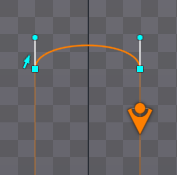
You can't remove them because they aren't actually part of the path geometry — they're just a display aid. They will not affect your animation or how the path constraint behaves.
If you don't want to see those lines at all, one option is to close the path by checking the Closed property. When a path is closed, the first and last knots are connected and those dashed extension lines disappear:

Of course, only close the path if it makes sense for your setup. If your path is meant to be open (like a curve with a start and end point), just leave it as is — those lines are harmless and purely visual.

